k6, AI and MCP: Exploring the next step in performance testing
13.08.2026
Performance testing has changed a lot during the years: from physical servers to cloud-based load testing and now AI-assisted workflows. In this blog, I look at that change through my own experience, and especially through a recent trial with k6, MCP and GitHub Copilot.
Where my performance testing journey started
I have been working with performance testing for over a decade. My first bigger projects were around eCommerce, where performance problems were very easy to connect to business impact. If an online store is slow or not available during an important campaign, the consequences are visible very quickly.
In the beginning, it took quite a while to learn things like throughput, load models, Little’s Law, architectural bottlenecks, load balancers, reporting and monitoring tools. Back then, the context was also very concrete: on-site servers, not scalable cloud. If the result was that the system needed more capacity, somebody had to buy, install, configure, and maintain actual physical hardware.
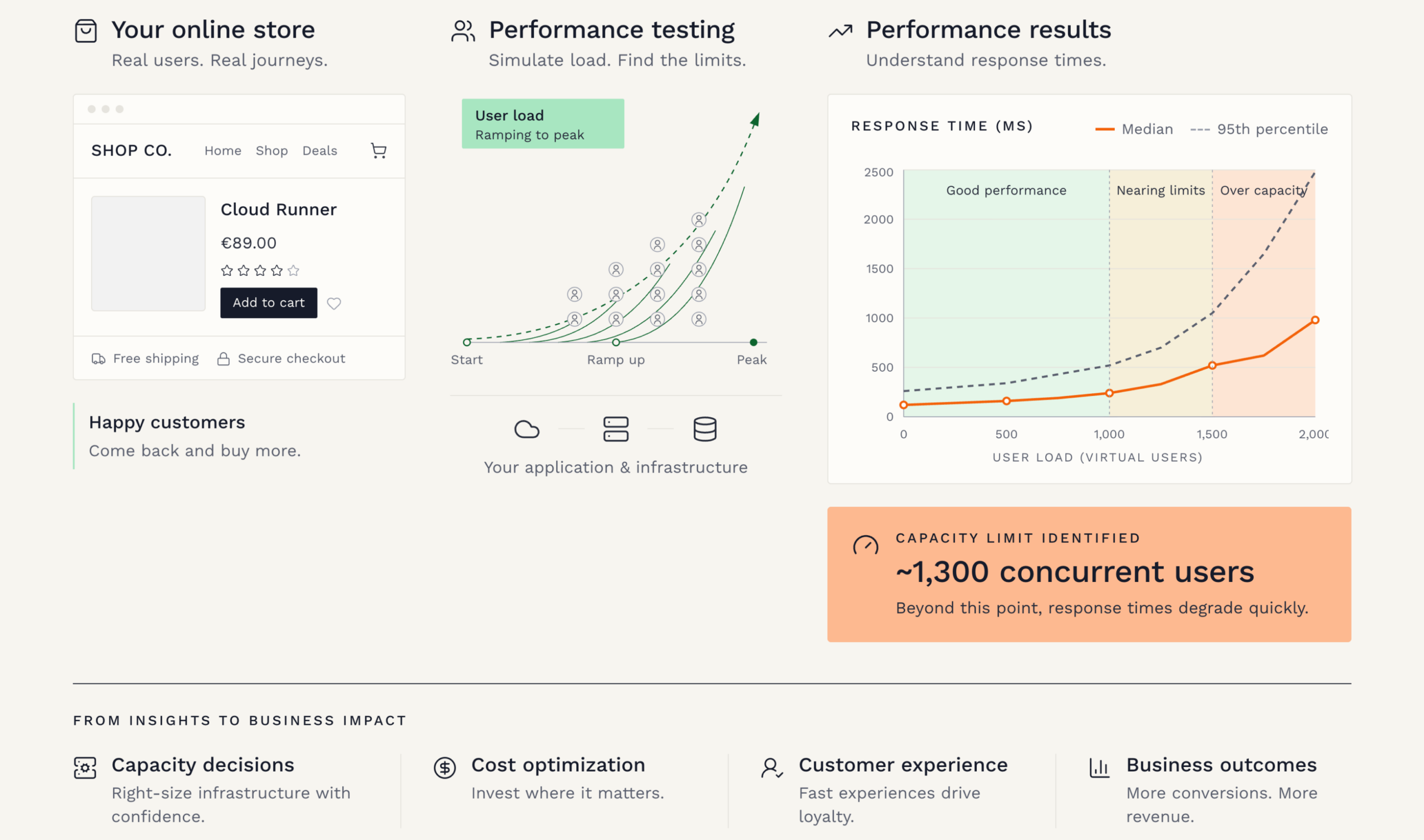
Today cloud environments can be scaled much more flexibly. But the basic question has not disappeared. Scaling still costs money, and it also has an environmental impact. That is why performance optimization still matters.
Performance is not only about risks
In general, I feel that performance testing is fascinating because its business impact can be very immediate. If a B2C eCommerce site crashes on Black Friday, it is business-critical, end of discussion. It is not only a technical problem. It is lost sales, disappointed customers, pressure on customer service, and sometimes also damage to the brand.
On the other hand, performance testing can also bring very positive findings. When you suddenly find out that, for example, quite a simple database optimization can improve performance and end-user experience a lot, it just feels very rewarding. The answer is not always “buy more capacity”. Sometimes the answer is “use the existing capacity better”.
Also, for some time, cloud was often seen almost as an endlessly scalable resource. Of course, cloud gives many good options to scale. But scaling also means bigger costs and a bigger CO2 impact. Why do that blindly, if performance can also be optimized? From a business point of view, this is quite important. Performance is not only about speed. It is also about cost, reliability, customer experience, and sustainability.
Cloud changed the way load tests are run
A few years ago, I ran into Azure Load Testing and immediately felt that hey, now something new is happening!
Traditionally, performance testing could require quite complicated setups: controller nodes, worker load generator nodes, network configurations, and many moving parts just to generate enough load. Azure Load Testing made this easier. It offered one managed solution that also enabled global load distribution. Global load distribution means that the load can be generated from different locations, not only from one machine or one data center. This matters because real users are often coming from different countries and networks.
Good old JMeter performance tests got new life with this modern and capable execution solution. JMeter itself is one of the classic open-source tools for performance testing. It has been used for years to simulate users and measure how systems respond under load. Many organizations have existing JMeter tests, so being able to run them in a modern cloud-based way is a very practical improvement.
For me, this was one clear shift in performance testing: the execution became easier and more cloud-native. Now we seem to be in the middle of another shift, where AI starts to support the planning and scripting work around performance testing.
Then came AI into performance testing
Now we seem to be entering another new phase: AI-assisted performance testing. k6 has been one of my tools for over 5 years. It is a performance testing tool where tests are written as code. This is very powerful, especially for teams that are comfortable with development practices, version control, and CI/CD pipelines. But for some cases, its approach just didn’t feel so optimal. And for some teams, the code-first approach was not the most suitable starting point. This is important to understand also from a business perspective. A tool can be technically very good, but if the team cannot easily start using it, the value comes slowly. Performance testing should not be something that only a few specialists can understand. Of course, expertise is still needed, but getting started should be easier.
Now k6 also supports AI-assisted performance testing through k6 x agent and MCP. In practice, this means that your existing AI assistant in the editor can use k6-related skills and tools to, for example, make a test plan, create test scripts, validate them, run tests, and even transform Playwright tests into performance tests.
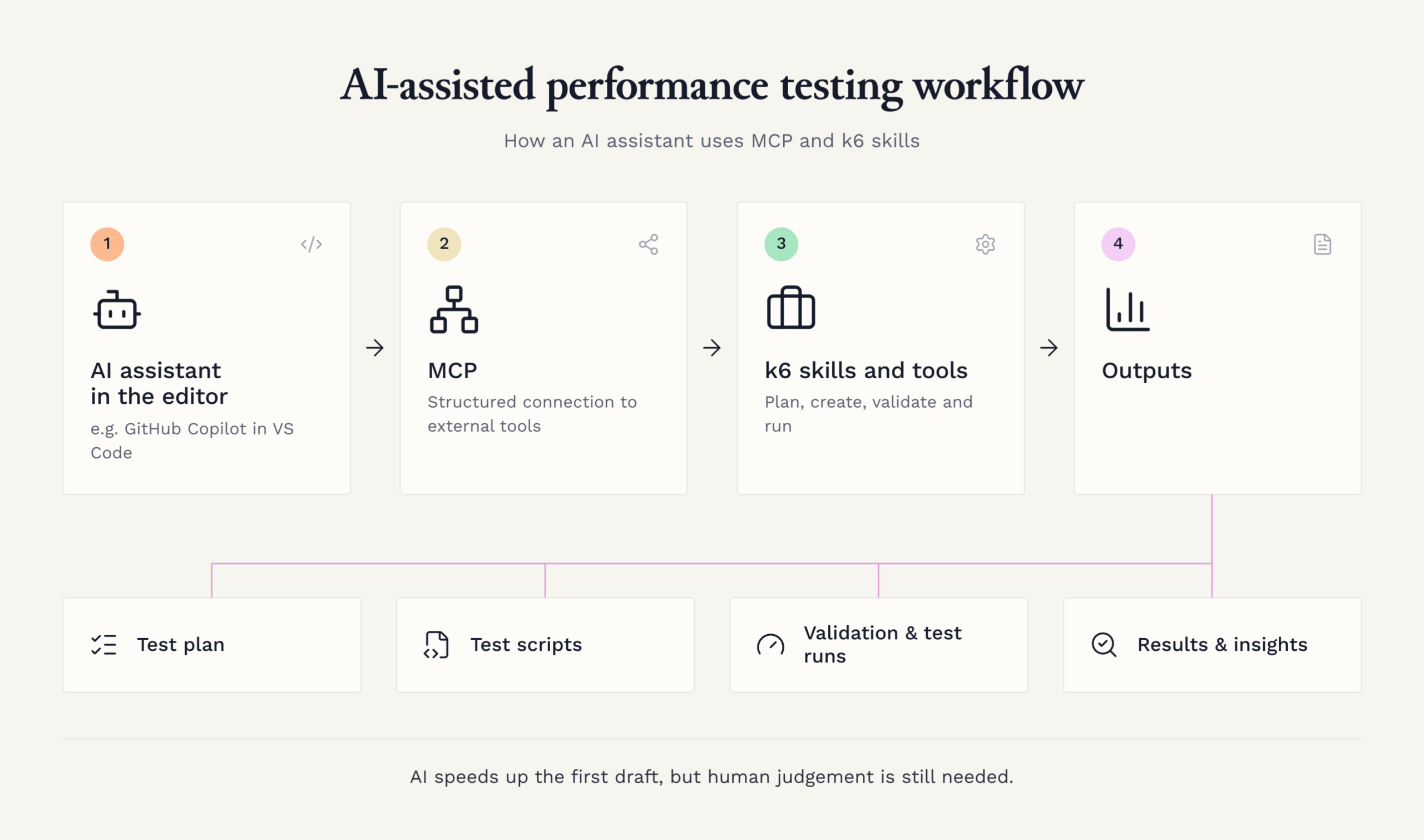
Some highlights from the k6 skills:
- The test plan skill helps with the thinking before the testing: what is important to test, what kind of load should be simulated, which user journeys matter most, and what risks should be covered. This is often the part where good performance testing either succeeds or fails. If the plan is weak, the test can look impressive but still not answer the right business question.
- The test script creation skill helps to turn the plan into actual k6 test scripts. This is useful because performance test scripts need both technical correctness and realistic behaviour. They should not only send requests, but also model how users or systems actually use the application. For me, this is a good example of where AI can speed up the first version, while still leaving room for an experienced person to review, adjust, and improve it.
- The Playwright converter skill is especially interesting because it can transform existing Playwright tests into performance tests. Playwright is commonly used for browser-based test automation. It automates user actions in the browser, for example logging in, searching, clicking, buying, or filling forms. Many clients have been asking for years how to easily utilize existing test automation in performance testing. It makes sense: if we already have automated tests that describe important user flows, why could we not reuse some of that work when testing performance?
Trying k6 x agent and MCP
After a year or so break, I installed k6 and set up the AI support with k6 x agent. Smooth and easy. I prefer VSCode and GitHub Copilot, so that was the choice here.
One important part in this setup is MCP, Model Context Protocol. In practice, MCP is a way for the AI assistant to use external tools in a structured way. It is not only a chat window where I ask “please write me a performance test”. Through the k6 MCP setup, the assistant can use k6-related guidance and tools, for example to create scripts, validate them, run tests, and look up relevant k6 documentation. This also means that the AI can do some practical exploration of the target system, when it has access to it. It can propose what to test, try out the generated test logic, see whether it works, and adjust based on the results. Of course, this does not remove the need for human judgement. The AI can explore what is technically visible, but it does not automatically know which user flows are business-critical, what kind of load is realistic, or what risks matter most.
First, I tried the test plan skill, then the load test skill, and finally the Playwright converter. The AI explored the target system quite well and tested the proposed solution against it. For all of these, I used quite a classical API / web test demo site, so no actual production content. This was enough for trying out the idea safely, without customer data or production risks.
What worked well
All in all, I have to say I was very happy with the results. The plan contained the elements I expected, with good reasoning. It included the kinds of things I would also want to see in a real performance testing plan: relevant user flows, load assumptions, risks, and ideas for what should be measured.
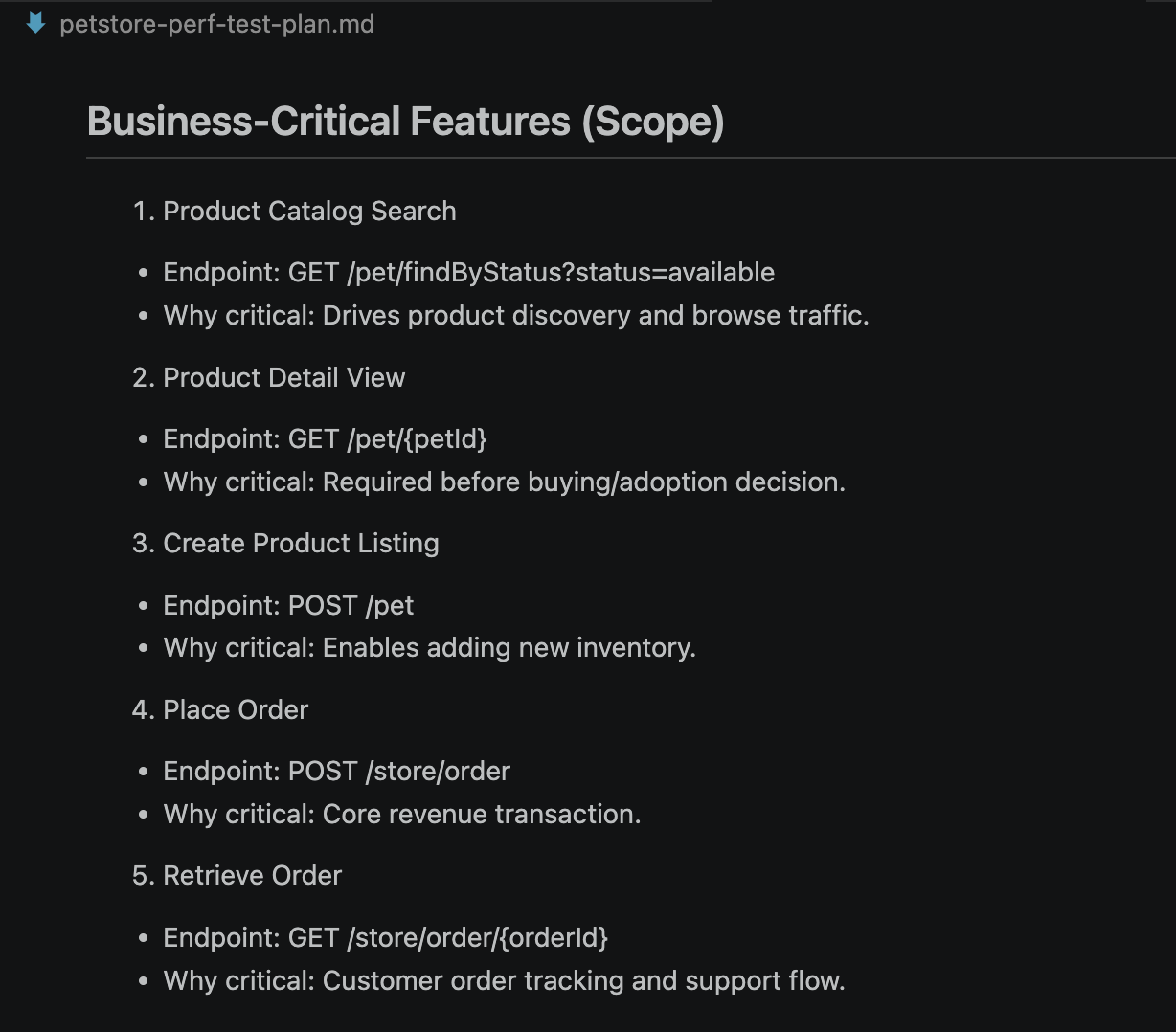
The test cases were also spot on to be used as a starting point for bigger script implementation. This is an important point. I would not say that AI magically removes the need for performance testing competence. But it can create a good first version much faster. Then an experienced person can review, adjust, and improve it.
Playwright conversion struggled a bit with async functions, but it was quite straightforward to fix those. This is also quite realistic. AI-generated results are not always perfect, but if the starting point is good enough, the benefit can still be big. Especially if it helps teams move from “we should do performance testing someday” to “we now have a first useful test to improve”.
All in all, the k6 AI experience was very good!
Experience still matters
But especially with this AI solution, I felt that all my performance testing experience was crucial to succeed. I knew what I wanted to be included in the plan. I knew how to prioritize features in the target system. I also knew what kind of risks are usually hidden in performance testing projects.
For example, authentication and authorization challenges may still be quite painful when proceeding to actual production use. Demo sites are simple. Real systems are not. In real life, you may have single sign-on, tokens, user roles, test data limitations, rate limits, third-party integrations, and security rules. These are not small details. They can decide whether the performance test is realistic or not.
And of course, there is always the question of where those tests should be run. Should they be run in Grafana Cloud, in some custom Kubernetes solution, in a specific solution for your cloud or hardware environment, or somewhere totally different? This is both a technical and business decision. It affects cost, scalability, maintenance, security, and how easily the results can be shared. But nowadays there are so many neat options that this is just a question to be answered.
AI lowers the starting barrier
For me, the most interesting part is not that AI writes a performance test script. The interesting part is that AI can make performance testing more approachable. It can help create the first plan, propose the first tests, and reuse existing automation assets. Still, someone must understand whether the test makes sense: are we testing the right user flows, with realistic load, in a realistic environment, and are we measuring things that matter for the business?
That is why I see AI in performance testing as a very good assistant, not as a replacement for expertise. The best results still come when AI is combined with human understanding of systems, risks, and business priorities. And that combination feels like a very promising direction.

- Blog |
- AI |
- perfomance testing